Organization browser in SharePoint 2010 June 3, 2012
Posted by Karim Zaki in Sharepoint 2010.1 comment so far
Organization browser in SharePoint 2010
very cool thing in SharePoint 2010 is the organization browser showing everyone in your organization in a very nice silver light control. However, i had quite some trouble setting that up in SharePoint 2010 beta and beta 2. Finally got it working on RC.
SharePoint 2010 comes with a feature called the ‘Organization Browser’ to display org chart style information. By default the web part is located on every user’s ‘My Profile’ tab on their MySite, but it can be added to other pages if required
The Silverlight driven web part uses the ‘manager’ field from user profiles to build up a hierarchy of people. Users can then navigate around this structure in an easy to use manner, viewing a wide range of information pulled from user MySites.
First of all you need to start the User Profile Synchronization service on the SharePoint server
Application Management
Go to Central administration —-application management —manage services on server
Start the service  once it’s started go to your service applications and select User Profile Service application and click Manage on the ribbon
Go to Central administration —-application management—manage services application


Under the profile synchronization connections create a new connection
 Wait until the profile synchronization is over.

This option depends on the manager field in the Organization tab in users property

This web part could be displayed in two ways first add the web part on any site
Edit the page on then insert
then web Part —Social Collaboration —-Organization Browser

Then it will appear

Or you can go to my site
And it is there by default
March 27, 2012
Posted by Karim Zaki in Uncategorized.4 comments

The Audit logon events policy records all attempts to log on to the local computer, whether by using a domain account or a local account. On DCs, this policy records attempts to access the DC only. The policy does not, for instance, track a user who uses a domain account to log on at a workstation. (In that case, the user isn’t logging on to the DC; the DC is simply authenticating the user.) To track all domain account authentication, you should use Audit account logon events.
OVERVIEW: Audit Logon Events March 27, 2012
Posted by Karim Zaki in Active Directory 2008.Tags: Audit Logon Events
1 comment so far
The Audit logon events policy records all attempts to log on to the local computer, whether by using a domain account or a local account. On DCs, this policy records attempts to access the DC only. The policy does not, for instance, track a user who uses a domain account to log on at a workstation. (In that case, the user isn’t logging on to the DC; the DC is simply authenticating the user.) To track all domain account authentication, you should use Audit account logon events.
Add Ribbon features to sharepoin March 27, 2012
Posted by Karim Zaki in Ribbon.add a comment
http://spribbonvisibility.codeplex.com/
Project Description
This SharePoint 2010 solution allow site administrator to define who can or cannot see the SharePoint ribbon.
In few words
With this solution you can on each site define if the ribbon is display or not for :

Screenshots


Add features to sharepoin March 27, 2012
Posted by Karim Zaki in Add features to sharepoin, stsadm -o.add a comment
query computers in Active directory March 25, 2012
Posted by Karim Zaki in dsquery computers, find information about user, inavtive, increase the View limit, net user.2 comments
##How to query inactive computers in AD And increase the View limit
open CMD then
dsquery computer -inactive 8 -limit 400″
### How to disable the inactive computers
OPen CMD then
“dsquery computer -inactive 8 -limit 400| dsmod computer -disabled yes”
###If you need to target a specific OU, simply place DN of the OU after the computer:
“dsquery computer “OU=Build,DC=Domain,DC=com” -inactive 8 | dsmod computer -disabled yes”
dsmove “cn=computer
**************************
To find out detailed information about a user account: net user username
C:\>net user etbain
********************
###To find out where (which OU) a user account resides in ADS:
dsquery user -samid username
*******************************
##to get the list of users who hasnt been active for the last 16 week
dsquery user -inactive 16 | dsget user -dn
****************************************************
## how to know on whcih DC the users has been authenticated
From Command prompt
ECHO %LOGONSERVER%
restore Deleted Objects from Active Directory 2008 March 25, 2012
Posted by Karim Zaki in Active Directory 2008, Delegation.2 comments
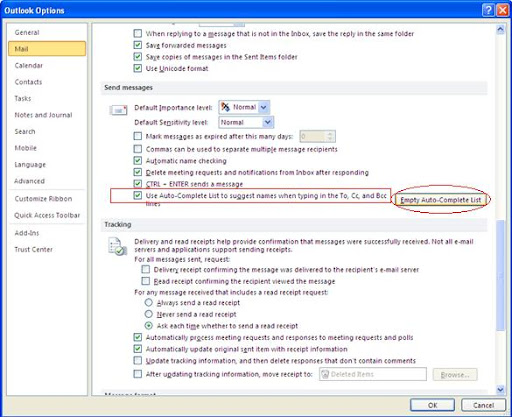
How to delete auto cashed Auto complete from outlook 2010 March 25, 2012
Posted by Karim Zaki in auto cashed, Auto complete, outlook 2010.add a comment
Go to file ——-> options


Developer dashboard sharepoint 2010 March 22, 2012
Posted by Karim Zaki in Developer dashboard sharepoint 2010, developer-dashboard, Stsadm –o setproperty –pn.19 comments
Make sure to copy the stsadm to under the c:\
C:\>stsadm -o getproperty -pn developer-dashboard
C:\>Stsadm –o setproperty –pn developer-dashboard –pv ondemand

The you will find a new icon beside the logon name in central admin


